
Parallax with React Spring
Parallax with React Spring
Created : 📅Wednesday 28th May 2025 Modified: 📅Wednesday 28th May 2025 11:40
title:
style: nestedList # TOC style (nestedList|nestedOrderedList|inlineFirstLevel)
minLevel: 2 # Include headings from the specified level
maxLevel: 0 # Include headings up to the specified level
include:
exclude:
includeLinks: true # Make headings clickable
hideWhenEmpty: false # Hide TOC if no headings are found
debugInConsole: false # Print debug info in Obsidian console
Introduction
The parallax effect is a trick that is used a lot in recent website. It gives some life to the page while providing a smooth experience for the user. It also is not as prominent as animations and if used tastefully can really elevate your landing page. It can be implement natively with html and css but is often a pain to deal with. The goal of this tutorial is to ease this process by using a handy library called React Spring backed by the Pmndrs team.
I decided to create this not mostly as a reminder of the core concepts that will be necessary to use the lib, as the examples in the documentations are working but not exhaustively explained.
In order to install the lib in a react project, use :
npm install @react-spring/parallaxCore Concepts
The library is fairly simple in the sense that it uses mainly two components :
- Parallax : which is the main container. It will contain all your pages.
- ParallaxLayer : is used to describe each layer. You should used a layer for each component that you want animated. You will be able to with different speed or starting point each layer.
Tips
For Parallax, there is not much to explain, you just have to be careful with the amount of page you are using.
For Layers, there is a few tricks that will help a lot while dealing with it.
- Each layer is a FULL PAGE in height. Do not try to change it. Handle the inside of the container instead.
- In order to have responsive page, prefer the use of % in order to place your components inside the Layer. Apply them on the margin property.
example:
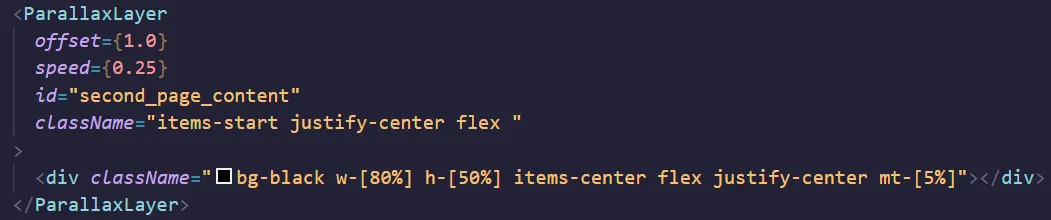
- I would recommend to offset on full page values and then place the element in the page if needed.
- speed is the key parameter to a smooth animation experiment with it and with negative values as well.
- When using sticky be careful. It will place the sticky Layer above regular Layers. Your content will then always be siplayed “behind” this layer. Be mindful when using it.
References
Tags : #React #TS #Code